
If a site being in trouble to couple with traffic is to be considered a good sign them it's a hell of a good sign. A picture is worth many, many words:
Image of the OpenOffice site that has been in difficulties since yesterday, the day of the launch of the third version of OpenOffice.
------
Se a dificuldade em lidar com tráfego é sinonimo de um bom sinal, então este é um óptimo sinal. Uma imagem vale mil palavras:
Imagem da página do OpenOffice que desde ontem, dia do lançamento da versão final do OpenOffice 3.0, tem estado com acessibilidade muito reduzida.
Showing posts with label open source. Show all posts
Showing posts with label open source. Show all posts
Tuesday, October 14, 2008
OpenOffice 3.0 demand / Procura pelo OpenOffice 3.0

Monday, April 21, 2008
100 aplications that make Linux even more useful / 100 aplicações que fazem o Linux ainda mais útil
Ubuntu Linux Help has a list of 100 Open Source applications that can really show the majority of the users they simply don't need closed source and waste €'s! Very nice compilation.
------
O site Ubuntu Linux Help tem uma lista de 100 aplicações Open Source que podem mostrar à maioria dos utilizadores que não necessitam do código fechado e de desperdiçar €'s.
Friday, April 18, 2008
New Inkscape brings lot's of goodies / O novo Inkscape traz muitas coisas novas
Thursday, April 17, 2008
Not good, bad, worse, totally wrong! / Nada bom, mau, pior, totalmente errado!
Sun will start to close source MySQL. This was one of my fears back on the announcement day. And they became reality! I hopped for something good, but it doesn't seem to be quite like that. Not good, not good...
------
A Sun vai começar a fechar o código do MySQL. Isto era um grande receio que eu tinha aquando do anuncio da compra. E agora tornou-se realidade! E esperava algo bem melhor, mas não me parece que se tenha realizado. Nada bom, nada bom...
Monday, April 14, 2008
Chose your distro / Escolha a sua distro
Linux presents a wide variety of choices, as it's typical of a Open Source project. So there is a excellent site for you to chose the perfect distro. Just answer a few questions and you'll be listed with some distros which are right for you according to your answers. Very good indeed!
------
O Linux apresenta uma variedade de escolhas, como é típico do software Open Source. Existe um site excelente para escolher a distribuição perfeita para si. Basta responder a umas perguntas simples a será mostrada uma lista das distribuições adequadas a si, de acordo com as respostas dadas. Muito bom mesmo.
Wednesday, April 9, 2008
Ubuntu Mobile facts / Alguns factos sobre o Ubuntu Mobile
Software livre nas escolas Portuguesas
Finalmente o Ministério da Educação começa a dar mostras de que não se vai deixar subjugar ao feudo da Microsoft. Espero que este seja o principio de uma nova era no Ministério. Eles criaram um portal dedicado ao Software Livre nas e para as escolas. Finalmente!
Android on a Nokia 810 / Android no Nokia 810
Here it his! This is what I like about open software, there are no barriers :) to the imagination. The Google Android OS for smart phones in a Nokia 810 tablet. And it looks pretty good. Go see it.
------
Aqui está ele! Isto é que eu gosto no software aberto, não há limites :) para a imaginação. O SO Android do Google no tablet Nokia 810. E parece muito bom. Vão dar uma olhada.
Monday, April 7, 2008
Salasaga no Ubuntu 7.10
Este é um Tutorial para instalar o ultimo Salasaga (no momento em que escrevo salasaga-0.8.0.dev-200803251321) no Ubuntu 7.10. Podem ver na imagem abaixo.
Vamos começar por instalar o Ubuntu standard. Depois disso instalamos todas as actualizações que existam disponíveis.
Depois vamos buscar o ultimo Salasaga neste link http://downloads.sourceforge.net/salasaga/salasaga-0.8.0.dev-200803251321.tar.bz2 (lembrem-se da localização onde gravam este ficheiro).
Já que estamos a fazer download vamos também buscar a ultima versão da livraria Ming neste link http://sourceforge.net/project/showfiles.php?group_id=18365&package_id=187304&release_id=540333. (lembrem-se da localização onde gravam este ficheiro).
Agora, e porque estamos a compilar o Salasaga a partir da fonte, vamos precisar de instalar estes pacotes. Basta abrir um Terminal (ir até ao menu Aplicações->Acessórios->Terminal).
E escrever isto na linha de comandos:
$ sudo apt-get install build-essential autoconf automake libtool xorg-dev libungif4-dev libgnome2-dev libgtk2.0-dev
(aqui vai ser pedida a nossa password, é só escreve-la e deixar o Ubuntu fazer o resto).
(aqui vai ser pedida a nossa password, é só escreve-la e deixar o Ubuntu fazer o resto).
Agora um pouco mais de linha de comandos, mas basta copiar o que está em baixo:
Vão até onde fizeram o download da livraria Ming.
Extrair os ficheiros:
$ tar -xjvf ming-0.4.0.beta5.tar.bz2
E compilar a livraria Ming:
$ cd ming-0.4.0.beta5
$ sh autogen.sh
$ ./configure
$ make
$ sh autogen.sh
$ ./configure
$ make
(se tudo correr bem como é suposto)
Instalar a livraria Ming:
$ sudo make install
(mais uma vez a password caso seja pedida.)
(mais uma vez a password caso seja pedida.)
Agora precisamos de criar uns links:
Na linha de comandos escrever:
$ sudo ln -s /usr/local/lib/libming.la /usr/lib/libming.la
$ sudo ln -s /usr/local/lib/libming.so.0.4.0 /usr/lib/libming.so
$ sudo ln -s /usr/local/lib/libming.so.0.4.0 /usr/lib/libming.so.0
$ sudo ln -s /usr/local/lib/libming.so.0.4.0 /usr/lib/libming.so
$ sudo ln -s /usr/local/lib/libming.so.0.4.0 /usr/lib/libming.so.0
De seguida ir até onde gravaram o ficheiro do Salasaga.
Extrair os ficheiros:
$ tar -jxvf salasaga-0.8.0.dev-200803251321.tar.bz2
Compilar:
$ cd salasaga-0.8.0.dev
$ autoconf
$ ./configure
$ make
$ autoconf
$ ./configure
$ make
(se tudo correr como previsto)
Instalar o Salasaga:
$ sudo make install
(novamente pode ser pedida a password).
(novamente pode ser pedida a password).
E já está! O software Salasaga estará disponível no menu Aplicações->Gráficos.

Cliquem e desfrutem deste excelente software.
Wednesday, April 2, 2008
Salasaga on Ubuntu 7.10
This will be a simple How-To about compiling Salasaga from source on a clean Ubuntu 7.10 machine. You can also go to the Salasaga Wiki where you'll find the same How-To (created by me :) ). I would like to thank Justin (Salasaga creator), not only for having created Salasaga but to let me contribute to it. Salasaga is "An Integrated Development Environment for producing eLearning" that generates swf (also know has Flash) files. Enough talk, let's get hour hands dirty!
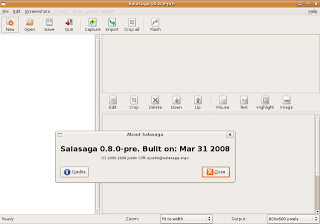
This is a how-to to get the latest Salasaga (at the moment of writing salasaga-0.8.0.dev-200803251321) working on Ubuntu 7.10. See the picture bellow.
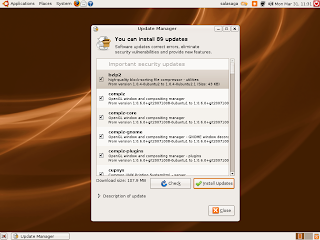
We'll start with a clean Ubuntu installation. After that we'll make the necessary updates available.
Then get the latest Salasaga from http://downloads.sourceforge.net/salasaga/salasaga-0.8.0.dev-200803251321.tar.bz2 (remember the location where you save this file).
Just as we are downloading also go get the latest libming from http://sourceforge.net/project/showfiles.php?group_id=18365&package_id=187304&release_id=540333. (remember the location where you save this file).
Now, because we are building Salasaga from source, we need some packages installed. Just open a Terminal window (go to Applications->Accessories->Terminal).
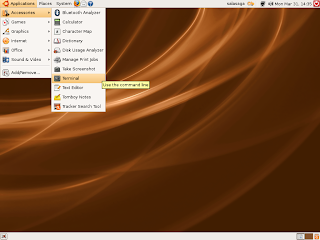
Then write this on the command line:
(Put your password as sudo will ask for it and sit back and relax until it's all done).
Now a little command line work but just copy the commands:
Go to where you downloaded the Ming file.
Extract the files:
And compile the Ming library:
$ cd ming-0.4.0.beta5
$ sh autogen.sh
$ ./configure
$ make
(if all goes well, as it is supposed to)
Install the Ming library:
Now let's create some simlinks:
On a terminal write:
$ sudo ln -s /usr/local/lib/libming.la /usr/lib/libming.la
$ sudo ln -s /usr/local/lib/libming.so.0.4.0 /usr/lib/libming.so
$ sudo ln -s /usr/local/lib/libming.so.0.4.0 /usr/lib/libming.so.0
Then go to where you downloaded the Salasaga file.
And extract the files:
Compile:
$ cd salasaga-0.8.0.dev"
$ autoconf"
$ ./configure"
$ make"
(if all goes well, as it is supposed to)
Install Salasaga:
$ sudo make install" (you'll be asked for your password).
And you're done! Salasaga will be on your Aplications->Graphics menu
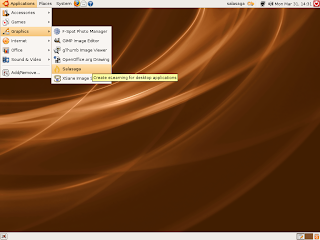
Click on it and you'll get Salasaga!
Enjoy!

We'll start with a clean Ubuntu installation. After that we'll make the necessary updates available.

Then get the latest Salasaga from http://downloads.sourceforge.net/salasaga/salasaga-0.8.0.dev-200803251321.tar.bz2 (remember the location where you save this file).
Just as we are downloading also go get the latest libming from http://sourceforge.net/project/showfiles.php?group_id=18365&package_id=187304&release_id=540333. (remember the location where you save this file).
Now, because we are building Salasaga from source, we need some packages installed. Just open a Terminal window (go to Applications->Accessories->Terminal).

Then write this on the command line:
$ sudo apt-get install build-essential autoconf automake libtool xorg-dev libungif4-dev libgnome2-dev libgtk2.0-dev
(Put your password as sudo will ask for it and sit back and relax until it's all done).
Now a little command line work but just copy the commands:
Go to where you downloaded the Ming file.
Extract the files:
$ tar -xjvf ming-0.4.0.beta5.tar.bz2
And compile the Ming library:
$ cd ming-0.4.0.beta5
$ sh autogen.sh
$ ./configure
$ make
(if all goes well, as it is supposed to)
Install the Ming library:
$ sudo make install (you'll be asked for your password)
Now let's create some simlinks:
On a terminal write:
$ sudo ln -s /usr/local/lib/libming.la /usr/lib/libming.la
$ sudo ln -s /usr/local/lib/libming.so.0.4.0 /usr/lib/libming.so
$ sudo ln -s /usr/local/lib/libming.so.0.4.0 /usr/lib/libming.so.0
Then go to where you downloaded the Salasaga file.
And extract the files:
$ tar -jxvf salasaga-0.8.0.dev-200803251321.tar.bz2"
Compile:
$ cd salasaga-0.8.0.dev"
$ autoconf"
$ ./configure"
$ make"
(if all goes well, as it is supposed to)
Install Salasaga:
$ sudo make install" (you'll be asked for your password).
And you're done! Salasaga will be on your Aplications->Graphics menu

Click on it and you'll get Salasaga!
Enjoy!
Monday, March 31, 2008
Gnome 2.22 Review
Thursday, March 27, 2008
Wednesday, March 26, 2008
Fedora 9 preview
Tuesday, March 25, 2008
Peach Movie has a trailer: Big Buck Bunny! / O filme Peach tem um trailer: Big Buck Bunny!
Wednesday, March 19, 2008
OpenOffice.org 3.0
Here it is a preview of what to expect from OpenOffice 3.0. It will be a good leap forward. Let's wait for it because it is still 167 days way.
------
Aqui está uma previsão do que será o futuro OpenOffice 3.0. Parece-me que será um bom salto em frente. Vamos esperar por ele pois ainda faltam 167 dias.
Tuesday, March 18, 2008
Gnome Panel Applets that can improve your desktop / Algumas applets que podem melhorar o Desktop
There are some unused or not well know applets for Gnome that help improve your Desktop. Linux.com has some of them listed and explained. Check it out.
------
Existem algumas applets do Gnome pouco usadas ou pouco conhecidas mas que podem tornar o Desktop num lugar melhor. O Linux.com tem algumas listadas e explicadas. Vão ver.
Monday, March 17, 2008
Build a highly functional desktop with lightweight software / Construir um desktop totalmente funcional com software "levezinho"
This is exactly what Open Source is all about! Change! Change what you don't like, what you need, what you fell you want to change, etc. In this case it was necessity that drove this person to adapt a Ubuntu Linux standard install into a super light, fast, desktop on top of a 1Ghz Via with 128Mb Ram (yes only 128!!!). Try this with Windows... if you can! With windows it would be a new computer and less €'s in your wallet.
-------
Isto é exactamente o que o Open Source permite! Mudança! Mudar o que não gostar, o que precisar, o que sentir que precisa de mudar, etc. Neste caso foi a necessidade que levou esta pessoa a adaptar uma instalação por defeito do Ubuntu e transformá-la num super leve, rápido, desktop em cima de um processador Via a 1Ghz e com apenas 128Mb Ram (sim, só 128!!!). Tentem fazer isto com o Windows... se conseguirem! Com o Windows era um PC novo e menos €'s na carteira.
Ubuntu Linux disk encription benchmarks / Teste à encriptação no Ubuntu
Ubuntu made available install time disk encryption since it's 7.10 version. And Phoronix is giving us a notion of how much it cost to have your disk totally encrypted. Best of all they made real use application tests. Go here to check it out.
------
O Ubuntu disponibiliza desde a sua versão 7.10 a possibilidade de encriptar todo o disco logo no instalação do SO (sistema operativo). O site Phoronix dá-nos uma noção do que isso significa em termos de perca de performance. E melhor ainda fazem-no em aplicações de uso real. Vão dar uma olhada aqui.
Subscribe to:
Posts (Atom)
